
The Difference Between Instructions and Constraints
Most people think better prompts come from writing clearer instructions. In practice, the biggest improvement often comes from defining better constraints.

What This Blog Covers
Instructions versus constraints
Why the distinction matters
How constraints reduce ambiguity
Real developer examples
Common prompting mistakes
A practical framework
Most People Treat Them As The Same Thing
If you ask ten people how to improve a prompt, most will suggest writing clearer instructions.
“Be more specific.”
“Explain what you want.”
“Add more detail.”
That advice is helpful, but it overlooks something more important. Instructions and constraints are not the same thing, and treating them as interchangeable is one of the reasons many prompts produce average results.
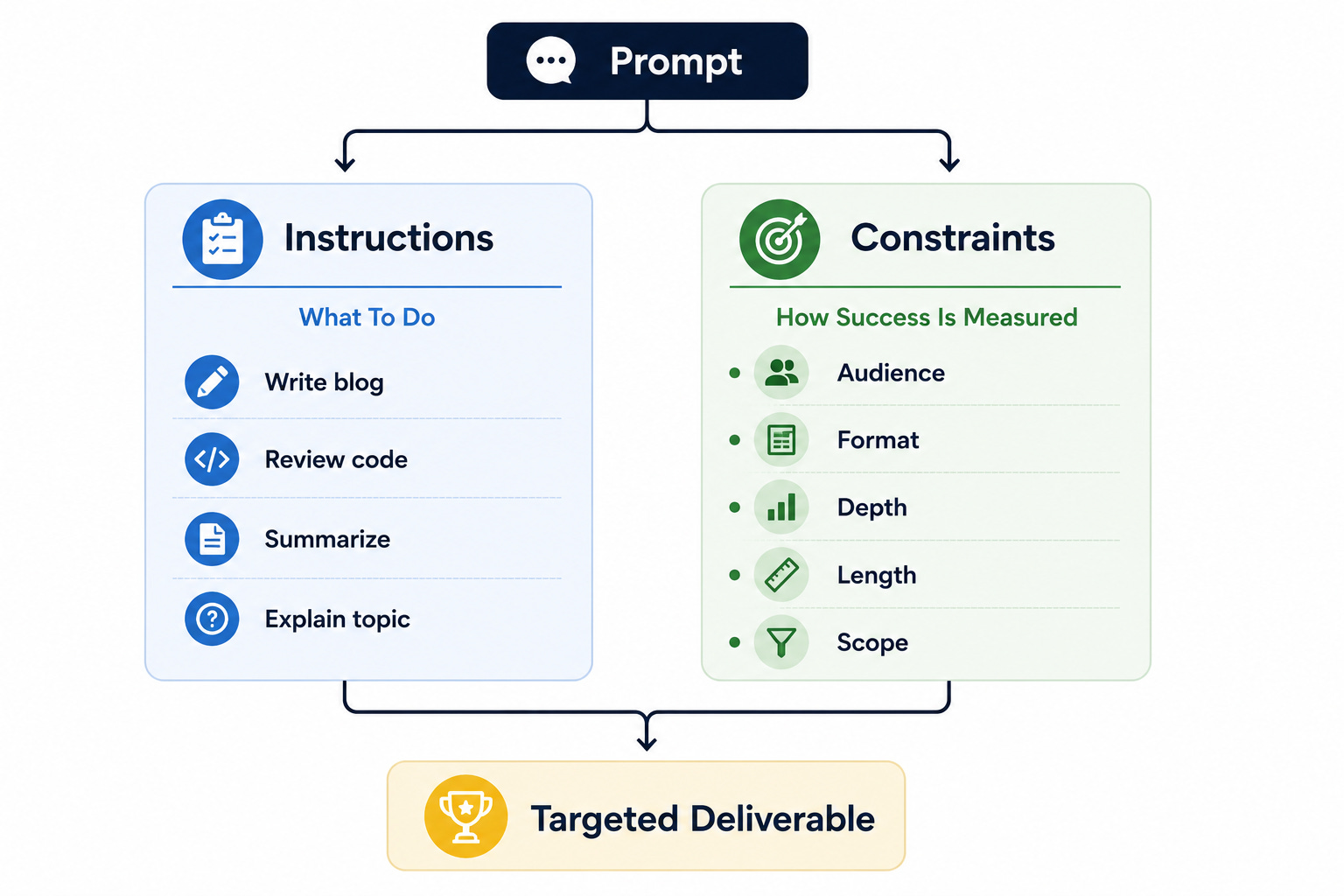
An instruction tells the model what work to perform.
A constraint defines the boundaries within which that work should be performed.
That distinction may sound subtle, but it changes how the model approaches the task.
A prompt with clear instructions but weak constraints often produces an answer that is technically correct yet misses the user’s actual objective.
The model completes the assignment, but it does so by making assumptions you never intended it to make.
Once you understand the difference, prompting becomes much less about finding clever wording and much more about defining the problem clearly.
Instructions Define The Task
Imagine asking a teammate to prepare documentation for a new API.
You might say:
“Write documentation for our authentication API.”
That is a perfectly valid instruction. It defines the task clearly enough that someone can begin working. However, it leaves many important questions unanswered. Should the documentation target internal engineers or external customers? Is it supposed to be a quick-start guide or a detailed technical reference? Should it explain implementation details or focus only on usage?
The instruction identifies the work.
It does not define the environment in which that work will be evaluated.
The same thing happens in prompting. Requests such as “summarize this article,” “review this code,” or “write a blog post” describe the task, but they say very little about what makes the result successful.
Instructions answer one question:
What needs to be done?
They rarely answer the equally important question:
What does a good outcome look like?
Constraints Define Success
Constraints fill the gap that instructions leave behind.
Returning to the API documentation example, imagine extending the assignment like this:
The audience is junior backend developers.
Readers already understand HTTP but are unfamiliar with OAuth.
Keep the guide under 1,500 words.
Include one end-to-end example request.
Avoid implementation details that application developers do not need.
Notice that none of these statements changes the task itself. The assignment is still to write API documentation. What changes is the definition of success.
Instead of asking the writer to guess the audience, level of detail, and scope, the constraints remove unnecessary decisions. The work becomes easier because expectations are now explicit.
Language models benefit in exactly the same way.
A constraint does not tell the model what to produce. It tells the model where the boundaries are.
Why Constraints Produce Better Results
Many disappointing outputs are not caused by poor reasoning. They are caused by reasonable assumptions that happen to be wrong.
Suppose someone asks for an explanation of distributed caching.
Without constraints, the model has to answer several questions on its own. Should the explanation target a university student or an experienced backend engineer? Should it prioritize conceptual understanding or operational trade-offs? Should it use analogies, diagrams, or production examples?
None of those decisions appears in the prompt.
The model fills the gaps with its own assumptions because it has no alternative.
Now imagine adding a few constraints.
The audience is a software engineer preparing for a system design interview. The explanation should focus on cache invalidation, consistency, latency, and real-world design trade-offs. Keep the discussion practical rather than academic.
The instruction did not change.
The constraints did.
That is why the output changes so dramatically.
Developers Already Work This Way
Software engineering provides countless examples of constraints.
A feature request might specify that a page should load in under two seconds. A database migration might require zero downtime. An API might need to support one million requests per day while remaining backward compatible. These are not implementation instructions. They are constraints that shape every design decision that follows.
This is exactly how system design interviews work.
Interviewers rarely tell candidates which architecture to choose. Instead, they define constraints such as expected traffic, latency targets, consistency requirements, storage limits, or availability goals. Two candidates may receive the same functional requirements yet arrive at completely different architectures because they interpret the constraints differently.
Prompting follows the same principle.
Strong prompts resemble good engineering specifications. They define the objective while also making the important constraints visible. The model can then spend its effort solving the problem rather than guessing the conditions under which the solution will be judged.
The Hidden Cost Of Missing Constraints
Missing constraints create invisible work.
Every unanswered question becomes another decision the model has to make on your behalf. Sometimes those decisions align with your expectations. Sometimes they do not.
This explains why many outputs feel “almost right.”
The writing may be grammatically correct. The reasoning may be sound. The structure may even be logical. Yet something still feels slightly off because the model optimized for a different definition of success than the one you had in mind.
People often respond by rewriting the instructions.
“Make it better.”
“Be more engaging.”
“Go deeper.”
Those requests still avoid the real issue.
Instead of adding another instruction, ask which important constraint is still missing. Is the audience unclear? Is the desired format undefined? Has the acceptable level of detail been specified? Does the model understand what should be excluded?
Answering those questions usually produces a bigger improvement than rewriting the instruction itself.
The Most Useful Constraints
Not every prompt requires a long list of constraints.
In many situations, answering a handful of practical questions is enough to transform the quality of the output.
Consider these categories.
Audience — Who is the work intended for?
Objective — What should the reader or user achieve after consuming the output?
Format — Should the result be an email, report, checklist, lesson, proposal, or table?
Scope — What should be included, and what should be left out?
Depth — Should the explanation introduce the topic or explore advanced trade-offs?
Length — Is a concise summary more useful than a comprehensive guide?
These constraints do not complicate the prompt.
They reduce ambiguity.
Instructions And Constraints Work Together
One without the other is incomplete.
A prompt with instructions but no constraints often produces generic work because too many important decisions remain open.
A prompt with constraints but no instruction is equally problematic because the model understands the boundaries but not the assignment itself.
The strongest prompts combine both.
The instruction provides direction.
The constraints provide focus.
Together they reduce unnecessary assumptions while preserving enough flexibility for the model to solve the problem effectively.
This is remarkably similar to good project management. A successful project begins with a clear objective and well-defined constraints. Teams know what they are building, who they are building it for, and the limitations they must respect. Prompting works best when treated with the same level of discipline.
A Practical Way To Think About Every Prompt
Before writing a prompt, separate the assignment into two parts.
First, write a single sentence describing the task.
That is your instruction.
Then ask yourself what information the model would need if it were a new teammate joining the project for the first time.
Who is the audience?
Why is this work being done?
What constraints matter?
What does success look like?
Those answers become the constraints.
This approach usually produces clearer prompts than spending five minutes searching for more sophisticated wording.
Instead of trying to make the instruction smarter, you make the environment around the instruction clearer.
Closing Thoughts
Prompt engineering is often presented as an exercise in writing better instructions.
In reality, many of the biggest improvements come from defining better constraints.
Instructions tell the model what to do.
Constraints explain how success will be judged. They reduce unnecessary ambiguity, eliminate avoidable assumptions, and help the model focus on the outcome that actually matters.
The next time a response feels generic or slightly off target, resist the temptation to rewrite the instruction immediately.
Instead, ask a different question.
What important constraint have I forgotten to define?
More often than not, that is where the real improvement begins.